← All insightsDocument redaction · 28 October 2026 · 8-minute read
What High-Accuracy Document Redaction Actually Takes
Reliable redaction does not come from asking one clever model to find the PII. It comes from layers, flexible rules and measuring the work reviewers still have to do.
By Tom Archambault
Anyone who has redacted mortgage, foreclosure or bankruptcy files knows the problem. A 200-page package holds loan numbers, account numbers, Social Security numbers, MIN numbers and barcodes, scattered across scans that range from crisp to barely readable.
Miss one and you have a problem. Over-redact, and the court, the client or the next person in the chain cannot read what they need.
We have spent a long time on this, and in our current testing we reach about 98% accuracy. What we learned getting there is not what most people expect.
AI is essential—but it is not the whole system
It is tempting to hand a document to a large language model and ask it to “find the PII.” For a few clean pages, that can look impressive. Across thousands of real pages it does not hold up. The model is inconsistent, it cannot explain every choice in a way an auditor will accept, and it has no idea what a particular client considers sensitive.
AI matters as one part of the system, not as the entire system.
There is no single definition of what should be redacted
One client wants investor codes hidden; another needs them visible. One firm treats a county recording number as public record; another wants it blacked out. Even within one company, bankruptcy and foreclosure teams can have different rules.
A tool that hard-codes one view of PII will always be wrong for someone. The real requirement is flexibility, with control in the hands of the people who know the rules.
You cannot redact what you cannot read
Scanned mortgages, notary stamps, handwritten figures and faxed pages defeat basic text recognition. AI-grade OCR is mandatory for strong results. We use AWS Textract in the customer's own AWS account, so documents remain under the customer's control and setup takes minutes.
The layered approach
Each pass catches what the last one missed.
No individual technique is perfect. Together, the layers create a result reviewers can rely on—and every decision can be traced to the rule that made it.
01Pattern matching casts a wide net
The first pass looks for anything shaped like a loan number, account number, Social Security number or similar identifier. It deliberately over-collects.
More than 120 controllable entities
Loan numbers, MIN numbers, title order numbers, case numbers, investor codes and more can each be allowed or blocked to match the client.
Key pairs recognise real-world variations
Loan No., Loan #, Loan Number and Ln Nbr can all identify the context around a value, even through punctuation, spacing and OCR quirks.
Allow and block lists handle exceptions
Exact values, starts-with rules, regular expressions and a pattern builder support fine-tuning without asking reviewers to write code.
Safe zones protect what must remain visible
Cover sheets, county recorder stamps, court headers and other defined regions can be kept clean.
Classifiers apply client-specific rules
The system can recognise the client or document type and apply the appropriate rule set without changing the outcome for everyone else.
Visual identifiers need a different model
Barcodes, QR codes and postal codes are not text, so OCR does not see them. Reaching roughly 99% barcode accuracy in our current testing required a custom-trained detection model. The same approach can identify other visual classes, including handwritten numbers or stamps that need protection.
Measure reviewer effort, not only accuracy
Accuracy percentages are useful, but they are not what a redaction team feels day to day. A percentage of over- or under-redaction does not show how much work people still do.
What matters more is user effort: how many times did a reviewer have to touch the document? Every added box, removed box and adjustment can be recorded. If reviewers are touching documents less, the system is improving. If one client's files or one document type keeps needing hands-on fixes, that is exactly where to tune next.
In managed operational deployments, that effort can be reported month by month. Fine-tuning becomes measurable: teams can see whether a rule change reduced the work and where more reviewer training is needed.
The human review is the point
No automated redaction is 100%, and anyone who says otherwise has not processed enough documents. The goal is to make human review quick, not to remove it.
That requires an editor where a reviewer can lasso an area or click once on a value and find it throughout the document. It also means highlighting the words the OCR was unsure about, so reviewers know where to look instead of rereading every line.
A decision you can inspect
Every allowed and redacted value keeps its reason.
The decision trace turns a black box into a reviewable record: what the scan considered, what happened to it and the rule that decided.
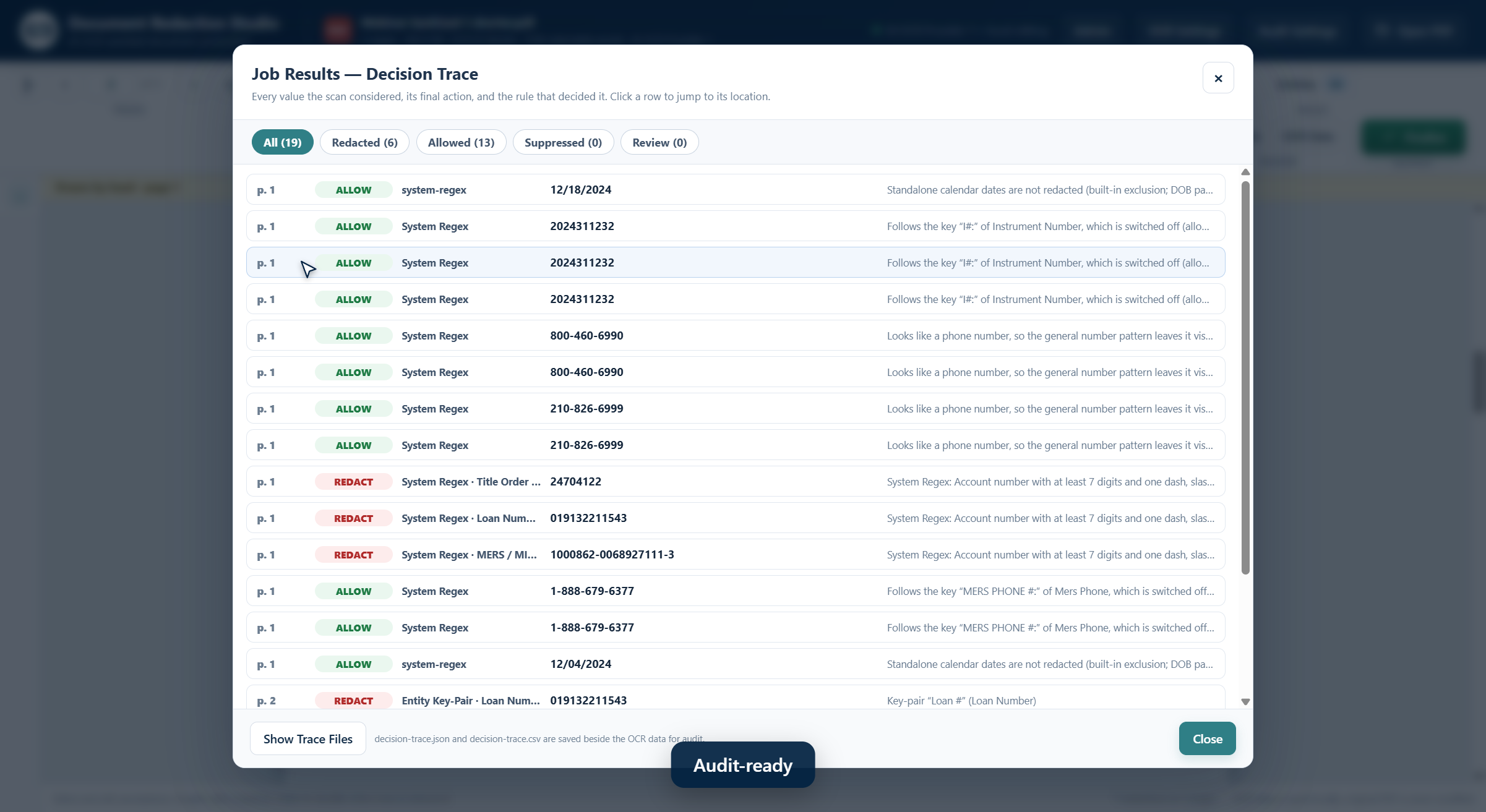
Actual product interface using fictional demonstration data.
A practical desktop deployment
Document Redaction Studio installs on a single PC, with no server and no separate IT project. Customers bring their own OCR and barcode-detection keys, so documents go only to services they control. Finalised pages are rebuilt from images so nothing beneath a redaction can be recovered.
High-accuracy redaction is possible today. It does not come from one clever model. It comes from layers, flexibility for clients whose definitions differ, and measuring the effort people spend—not just a percentage.
If your team still redacts by hand, or has tried AI and been disappointed, I am happy to compare notes.